Who Really Has Permissions in Entra and Azure? Mapping PIM, RBAC, and Scope Sprawl
Categories: Cloud IAM , Authentication & Federation , Zero Trust Architecture
Tags: microsoft-entra , azure-rbac , pim , permission-sprawl , least-privilege , identity-governance , zero-trust
Series: Microsoft Entra Security
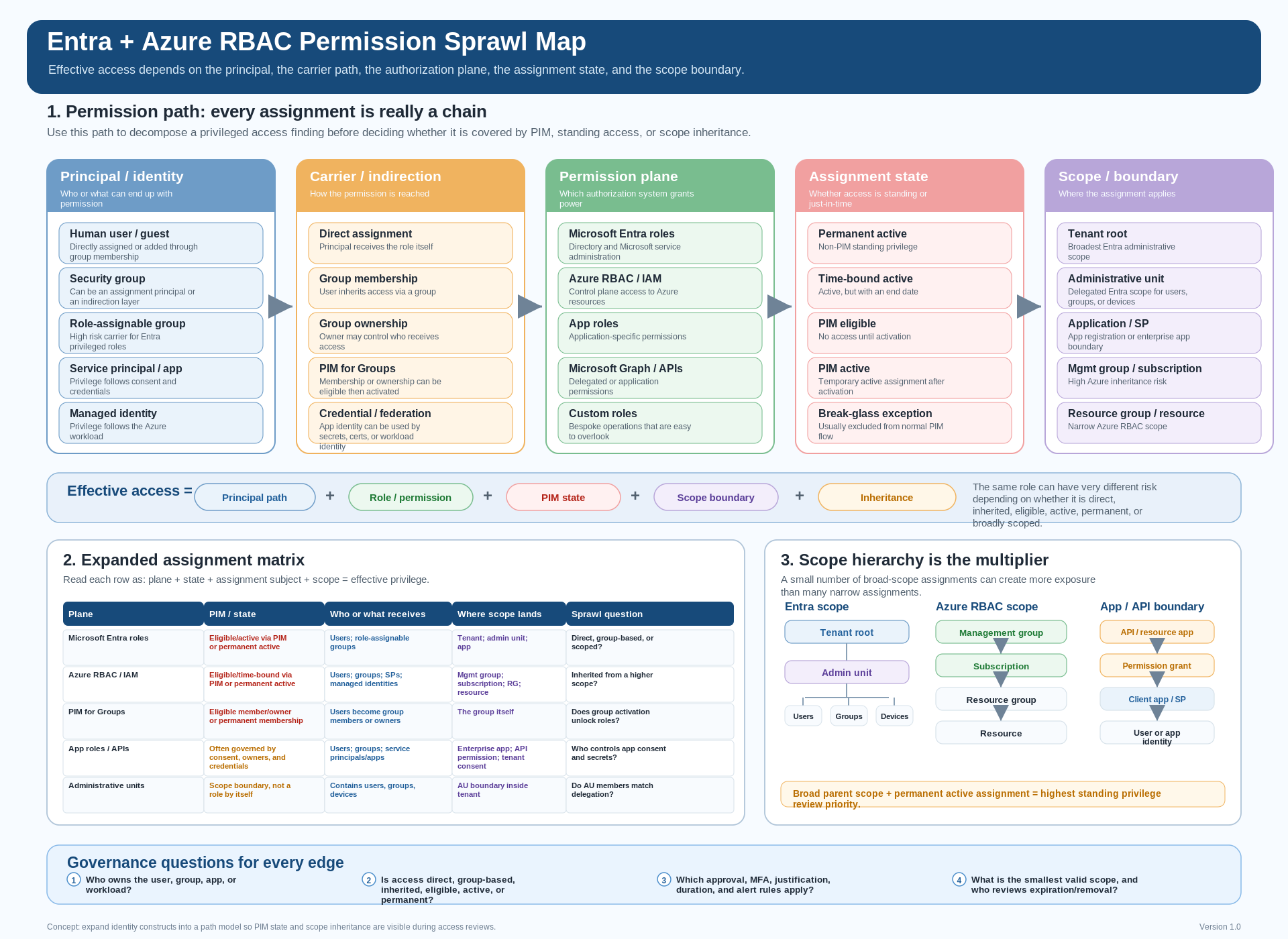
Entra and Azure permission sprawl map. Click or tap the diagram to open it full size.
Table of contents
- The core problem
- Why permissions are paths, not lists
- The five layers of permission sprawl
- Why PIM does not make the model simple
- Example paths that create hidden privilege
- What the diagram is trying to show
- Practical governance questions
- Takeaway
The core problem
Modern Microsoft cloud access is no longer just a question of:
- Who is a Global Administrator?
- Who has Owner on the subscription?
- Which users are assigned privileged roles?
That view is too simple.
In Microsoft Entra and Azure, privilege can be:
- Assigned directly to a user
- Inherited through a group
- Activated through Privileged Identity Management
- Delegated through an administrative unit
- Granted to an application
- Carried by a managed identity
- Inherited from a higher Azure scope
The result is a permission model that may look clean in individual admin portals, but becomes much harder to reason about when you try to answer the real governance question:
Who, or what, can become privileged — and where?
Why permissions are paths, not lists
Most access reviews still behave like permissions are a flat list:
- Alice has Role X.
- Group Y has Role Z.
- App A has Graph permission B.
- Subscription C has Owner assignments.
That is useful, but incomplete.
In Microsoft cloud environments, effective privilege is usually a path:
Principal -> Carrier -> Permission Plane -> Assignment State -> Scope
A user may not have a privileged role directly, but the user may still be able to become privileged through another path.
For example:
- A user is eligible to activate membership in a role-assignable group.
- The group is assigned an Entra role.
- The role is scoped to the tenant, an application registration, or an administrative unit.
- The user activates access through PIM.
- The user now has effective privileged access.
The same pattern can exist in Azure across:
- Management groups
- Subscriptions
- Resource groups
- Individual resources
So the governance question should not only be:
Who has the role?
It should also be:
How did they get it, can they activate it, and how far does it reach?
The five layers of permission sprawl
A practical way to model Entra and Azure access is to break it into five layers.
| Layer | What it answers | Examples |
|---|---|---|
| Principal | Who or what can receive access? | User, group, guest, service principal, managed identity |
| Carrier | How does privilege move? | Group membership, PIM for Groups, app consent, ownership |
| Permission plane | Which access system is affected? | Entra roles, Azure RBAC, app roles, Microsoft Graph |
| Assignment state | Is access active or activatable? | Active, eligible, time-bound, permanent, outside PIM |
| Scope | Where does access apply? | Tenant, app, administrative unit, management group, subscription, resource group, resource |
1. Principal
The principal is the identity or object that can participate in access.
Common principals include:
- Human users
- Guest users
- Security groups
- Role-assignable groups
- Service principals
- Enterprise applications
- User-assigned managed identities
- System-assigned managed identities
The common mistake is treating “user access” as the whole problem.
In reality, non-human identities can hold durable and high-impact permissions. A service principal with Microsoft Graph application permissions or a managed identity with Azure RBAC can be just as privileged as a human administrator.
2. Carrier or indirection layer
The carrier is the object or mechanism that moves privilege from one place to another.
Common carriers include:
- Direct group membership
- Nested group membership
- Role-assignable group membership
- PIM for Groups activation
- Application consent
- Managed identity assignment to a workload
- Ownership of a privileged group
- Ownership of an application registration or enterprise application
This is where hidden access often appears.
A person may not have a privileged role directly, but they may still have a path to privilege if they can:
- Modify a privileged group
- Own a group that carries privileged access
- Activate group membership through PIM
- Own an application with high-impact permissions
- Control a workload that uses a privileged managed identity
From a governance perspective, group membership is not just membership. It can be a privileged access path.
3. Permission plane
There is no single Microsoft permission plane.
At minimum, IAM, PAM, IGA, and cloud security teams need to distinguish between:
- Microsoft Entra roles for directory and identity administration
- Azure RBAC for Azure resource management
- Application roles for application-specific authorization
- Microsoft Graph delegated permissions for user-context access
- Microsoft Graph application permissions for app-only access
These planes are not equivalent.
For example:
- Entra roles affect identity and directory administration.
- Azure RBAC affects Azure resource management.
- Microsoft Graph application permissions may allow an app to access data without a signed-in user.
- Application roles may control access inside a specific application.
This is why “admin access” cannot be reviewed from only one console.
4. Assignment state
Assignment state is where PIM changes the conversation.
A privileged assignment may be:
- Permanently active
- Time-bound active
- Eligible through PIM
- Activated through PIM
- Eligible through group membership
- Active through group membership
- Outside PIM entirely
PIM is powerful, but it does not erase privilege. It changes when and how privilege becomes active.
The governance question becomes:
Is the privilege active now, or can it become active later?
Both matter.
5. Scope boundary
Scope is where permission sprawl becomes blast radius.
In Azure RBAC, scope may exist at:
- Management group
- Subscription
- Resource group
- Resource
A role at management group scope can be far more impactful than the same role at resource group scope.
In Entra, scope works differently. Some roles may be tenant-wide, while others may be scoped to:
- Administrative units
- Application registrations
- Specific directory resources
- Specific delegated administration boundaries
Administrative units are especially important to model correctly. They are not just another principal. They are a scope boundary for delegated administration.
That nuance matters during access reviews.
Why PIM does not make the model simple
PIM is often treated as the answer to privileged access.
It is better to treat PIM as one control inside a broader access graph.
PIM can help reduce standing privilege by supporting:
- Eligible assignments
- Time-bound activation
- Approval workflows
- Justification requirements
- Activation duration limits
- Auditability
But PIM also introduces another assignment state.
A user may be:
- Eligible for an Entra role directly
- Eligible for an Azure RBAC role directly
- Eligible to activate membership in a privileged group
- Eligible to activate ownership of a privileged group
- Active through one path and eligible through another
- Permanently active through a legacy assignment outside PIM
This is why “we use PIM” is not the same as “we have least privilege.”
The real question is:
Which identities can cross from non-privileged to privileged, through which path, and at which scope?
Example paths that create hidden privilege
Path 1: Group to Azure RBAC
A security group is assigned Contributor at subscription scope. A user is added to the group. The user now has Contributor over the subscription.
That may be expected, but the governance issue is broader.
Review questions:
- Who owns the group?
- Who can modify group membership?
- Is membership permanent or PIM-controlled?
- Is the assignment at subscription scope when resource group scope would be enough?
- Is the group reused across multiple subscriptions?
- Are guest users allowed in the group?
- Are nested groups involved?
Risk pattern:
- Broad Azure RBAC assignment
- Group-based indirection
- Weak group ownership controls
- Subscription-level blast radius
Path 2: PIM for Groups to Entra role
A role-assignable group has an Entra admin role. A user is eligible for membership in that group through PIM for Groups.
At rest, the user may not appear as an active administrator.
But they can become one.
That may be the right design, but the group should be governed like a privileged role assignment because membership activation is effectively role activation.
Review questions:
- Who is eligible for membership?
- Who is eligible for ownership?
- Who approves activation?
- Is justification required?
- How long can activation last?
- Which Entra role does the group carry?
- Is the role tenant-wide or scoped?
Risk pattern:
- Privilege hidden behind group activation
- Eligibility treated as lower risk than active access
- Group ownership overlooked during access reviews
Path 3: Application permission to Microsoft Graph
A service principal has Microsoft Graph application permissions.
Unlike delegated permissions, application permissions are used by apps to act as themselves, without a signed-in user.
That means the access review should not stop at human administrators.
Review scope should include:
- App registrations
- Enterprise applications
- App owners
- Client secrets
- Certificates
- Federated credentials
- Admin consent grants
- Graph permissions
- Workload identity federation
- Sign-in and usage history
Risk pattern:
- Stale application
- High-impact Graph permission
- Long-lived credential
- Weak app ownership governance
- No recent sign-in review
A stale app with high Graph permissions can become a durable privilege path.
Path 4: Managed identity to Azure RBAC
A managed identity is assigned a role on a resource group. The workload using that identity can now perform the actions granted by that role.
Managed identities are useful and often preferable to secrets. But they still need authorization governance.
Review questions:
- Is the identity user-assigned or system-assigned?
- Which workloads can use it?
- Is it reused across environments?
- Does it have more Azure RBAC than required?
- Is the assignment scoped narrowly enough?
- Does deletion of the workload remove the access path?
- Who can modify the workload that uses the identity?
Risk pattern:
- Non-human identity with broad Azure RBAC
- Reused identity across workloads
- Weak workload ownership controls
- No lifecycle review for the managed identity
Managed identities reduce credential handling risk, but they do not remove authorization risk.
What the diagram is trying to show
The diagram is trying to make one idea clear:
Permission sprawl is not only about who has access. It is about who or what can receive, carry, activate, delegate, and inherit access.
A flat matrix is useful for showing whether a construct can participate in a permission system. But a permission-path model is better for explaining real-world governance complexity.
The model is:
Principal -> Carrier -> Permission Plane -> Assignment State -> Scope
That full path is what IAM, PAM, IGA, and cloud security teams need to inventory.
Not just:
- Users
- Roles
- PIM assignments
- Subscriptions
- Groups
- Applications
The whole path matters.
Practical governance questions
Use these questions when reviewing privileged access in Entra and Azure.
| Question | Why it matters |
|---|---|
| Who or what is the principal? | Identifies whether access belongs to a user, group, service principal, managed identity, guest, or application. |
| Is the assignment direct or indirect? | Reveals hidden access through groups, PIM for Groups, app consent, ownership, or workload identity. |
| Which permission plane does it affect? | Separates Entra roles, Azure RBAC, app roles, Microsoft Graph, and application-specific authorization. |
| Is it active, eligible, permanent, or time-bound? | Ensures PIM-controlled access and non-PIM access are reviewed together. |
| What is the scope? | Determines blast radius across tenant, administrative unit, app registration, management group, subscription, resource group, or resource. |
| Who can change the path? | Identifies group owners, app owners, privileged role administrators, subscription owners, and automation identities. |
| What happens if the identity is compromised? | Connects the path to real-world impact and incident response. |
Review checklist
For each privileged path, capture:
- Principal type
- Principal owner
- Assignment source
- Carrier object
- Permission plane
- Role or permission
- Assignment state
- Scope
- Activation method
- Approval requirement
- Last used date
- Last reviewed date
- Business justification
- Break-glass or emergency dependency
- Deprovisioning owner
This turns access review from a static role list into a graph-based governance exercise.
Takeaway
In Entra and Azure, access is not just assigned. It is composed.
Key points:
- A user can become privileged through a group.
- A group can become privileged through a role assignment.
- An application can become privileged through consent.
- A managed identity can become privileged through Azure RBAC.
- A role can become dangerous because of scope.
- An eligible assignment can become active through PIM.
- Permission sprawl needs to be modeled as a graph, not a list.
- PIM is an activation control, not a complete permission boundary.
- The practical goal is not simply to find every administrator.
- The practical goal is to find every path to administration:
- Human and non-human
- Active and eligible
- Direct and indirect
- Tenant-wide and scoped